update-event

#All
Best Large Format 3D Printer Under $500 (2026): Longer LK10 Plus (Starting at $299)

On April 7, Longer officially released the LK10 series, featuring FDM 3D printers with Klipper-compatible high-speed printing, a large 320×320×400 mm build volume, and automatic bed leveling. Early bird pricing starts at $299, available now on the official website: https://www.longer3d.com/products/lk10-plus-fdm-3d-printer

The Longer LK10 / LK10 Plus FDM 3D Printer are designed for makers, educators, and product designers who need a more efficient desktop 3D printing solution. With a Klipper high-speed control board, up to 500 mm/s printing speed, high-flow direct-drive extruder, and eddy-current auto bed leveling, the LK10 series balances speed, stability, and usability. Compared to standard desktop 3D printers, the LK10 series offers larger build volumes and faster production, making large or complex prints easier to achieve. Key upgrades such as enhanced thermal management, automatic filament detection, and intelligent automation ensure high performance and reliability for desktop 3D printing.

Quick Overview 

  • Best for: beginners, makers, and small businesses

  • Key advantage: large-format 3D printing + high-speed performance

  • Max speed: up to 500 mm/s with Klipper firmware

  • Build volume: up to 320×320×400 mm

  • Starting price: $299

Product Overview

Model: Longer LK10 / LK10 Plus FDM 3D Printer

Printer Type: FDM Desktop 3D Printer 

Build Volume: 225×225×265 mm / 320×320×400 mm 

Max Print Speed: 500 mm/s 

Max Acceleration: 10,000 mm/s² 

Firmware: Klipper High-Speed Board 

Extruder: 9.5:1 High-Flow Direct-Drive 

Auto Bed Leveling: Eddy Current Auto Bed Leveling 

Heatbreak: Copper-Titanium Bi-Metal 

Cooling: 5015 High-Flow Model Fan 

Display: 4.3-inch Full-Color Touchscreen 

Early Bird Price: $299 / $419.99 

Core Highlights:

 Large 320×320×400 mm print volume 

 Klipper high-speed printing up to 500 mm/s 

 Eddy-current auto bed leveling for precise first layers 

 High-flow direct-drive extruder 

 Built-in filament run-out detection 

Larger Build Volume – Unleash Your Creativity

As 3D printing continues to expand, the demand for larger print sizes grows. The LK10 Plus offers a 320×320×400 mm build volume, allowing for large models without splitting or assembling parts.

This larger build volume is ideal for:

  •  Complex architectural models 

  •  Life-size character sculptures 

  •  Automotive prototypes 

  •  Functional engineering parts 

  •  Large-scale art projects 

For users searching for a large desktop 3D printer, the LK10 Plus significantly reduces post-processing and assembly time while improving workflow efficiency.

Klipper High-Speed Board – Faster Printing Without Compromise

The LK10 Plus features a high-speed control board compatible with Klipper firmware, delivering advanced motion algorithms and smooth high-speed printing:

  • Max print speed: 500 mm/s 

  • Max acceleration: 10,000 mm/s² 

With Klipper, printing large and complex models is faster while maintaining stability. The board includes 8GB storage, supporting large print files, and motion sensors on the X and Y axes automatically calibrate parameters for consistent performance during high-speed printing.


High-Flow Direct-Drive Extruder – Maximize Material Potential

The LK10 series uses a high-flow direct-drive extruder with a 9.5:1 high-reduction gear ratio and HRC60+ hardened gears. This design ensures:

  •  Strong, stable filament extrusion 

  •  Smooth printing at high speeds 

  •  Excellent compatibility with flexible filaments like TPU 

The near-end direct-drive reduces filament path length, lowering resistance and retraction delays, providing reliable extrusion for large, high-speed prints and versatile material options.

Eddy-Current Auto Bed Leveling – Perfect First Layers Every Time

The LK10 series features eddy-current auto bed leveling, a non-contact system that precisely scans the bed surface for height variations. Unlike traditional point-based leveling, it performs linear scans for higher accuracy and faster setup. During printing, real-time Z-axis compensation ensures even layers, reducing warping and clogs.

This feature is especially beneficial for beginners looking for an easy-to-use 3D printer with automatic leveling.

Smart Automation – Less Intervention, More Productivity

The LK10 series includes intelligent automation features:

  • Filament run-out detection: Pauses prints automatically when filament runs out 

  • Semi-automatic belt tensioning: Maintains optimal belt tension without manual adjustments 

These features enhance reliability and ease of use, letting you focus on creating rather than troubleshooting.

Copper-Titanium Bi-Metal Heatbreak – Optimized Thermal Management

The Copper-Titanium bi-metal heatbreak combines:

  • Titanium section: High strength, low thermal conductivity to prevent premature filament softening 

  • Copper section: Excellent thermal conduction for efficient heat dissipation 

This design ensures stable extrusion and precise thermal control, reducing clogging and maintaining consistent print quality for long-duration prints.

Additional Upgrades for Better User Experience

In addition to core upgrades, the LK10 series FDM 3D printer includes several improvements designed to enhance usability and print quality.

  • 5015 High-Airflow Cooling Fan

The 5015 cooling fan provides stronger airflow for faster model cooling, helping improve overhang performance and fine detail accuracy.

  • Optimized PEI Build Plate

The PEI build plate offers excellent adhesion and helps reduce warping, ensuring a stable first layer and more reliable prints.

  • 4.3-Inch Full-Color Touchscreen

A 4.3-inch full-color touchscreen provides an intuitive interface for adjusting settings and monitoring print status in real time.

Unboxing and First Impressions

The LK10 series desktop FDM 3D printer arrives in well-protected packaging with foam inserts that secure each component during shipping. The printer comes partially pre-assembled, allowing users to complete setup with just a few simple steps.

Inside the box are the gantry frame, base unit, 4.3-inch touchscreen, filament holder, power cable, sample filament, tool kit, USB drive, and installation screws. The instruction manual provides clear illustrations, making the setup process easy even for first-time FDM 3D printer users.

Once powered on, the touchscreen interface is responsive and easy to navigate. The eddy current auto bed leveling system automatically scans the build plate before printing, helping ensure a stable first layer. Combined with the high-flow direct-drive extruder and a 320 × 320 × 400 mm build volume, the LK10 series delivers a smooth and beginner-friendly first printing experience.

FAQ – Common Questions About LK10

Q: What is the maximum print size?

A: LK10 Plus offers 320×320×400 mm, ideal for large models, architectural structures, and industrial prototypes.

Q: Does it support high-speed printing?

A: Yes, with Klipper firmware, the LK10 Plus supports 500 mm/s print speed and 10,000 mm/s² acceleration, drastically reducing print times.

Q: What type of extruder does it use?

A: A high-flow direct-drive extruder with 9.5:1 reduction gear ratio and HRC60+ hardened gears, compatible with flexible filaments like TPU.

Q: Does it have automatic leveling?

A: Yes, with eddy-current auto bed leveling, it scans the bed and applies real-time Z-axis compensation for consistent layers.

Q: Who is it suitable for?

A: Makers, educators, product designers, prototyping teams, and small-scale manufacturing users. The large build volume and Klipper high-speed printing make it highly efficient for desktop applications.

The Longer LK10 / LK10 Plus FDM 3D Printer bring high-speed, large-volume, and automated 3D printing to your desktop. Available now at early bird prices of $299 and $419.99. Take advantage of this opportunity to enhance your creativity, prototyping, and productivity.

Available now on the official website: https://www.longer3d.com/products/lk10-plus-fdm-3d-printer

By update-event | April 11, 2026
LONGER ePrint Featured on All3DP — A New Benchmark in Desktop UV Texture Printing

The LONGER ePrint UV-texture printer series has recently been featured on All3DP, one of the industry’s most reputable platforms for 3D printing and digital fabrication.
The article highlights ePrint as a major breakthrough in personal and studio-grade UV printing—thanks to its dual-printhead architecture, true 60 mm raised texture technology, and a fully AI-driven design-to-print workflow.

https://all3dp.com/4/longer-releases-eprint-the-worlds-first-dual-printhead-3d-texture-personal-uv-printer/

A Breakthrough in Personal UV Texture Printing

All3DP describes the LONGER ePrint as the world’s first personal-grade dual-head UV printer, engineered for creators and small businesses seeking industrial-quality texture, speed, and versatility.
Its dual-printhead, 12-channel configuration enables rich color output, rapid material layering, and seamless multi-pass workflows. This results in:

  • Up to six times faster production

  • Stronger, sharper tactile layering

  • More flexible multicolor and special-effect printing

The ePrint brings professional UV printing capability into a compact, desktop-size form factor.

True 60 mm Raised Texture — Bringing Tactile Depth to Desktop UV Printing

A major highlight from the All3DP review is the ePrint’s up to 60 mm raised-texture performance, far beyond the slight bump typically associated with UV layering.
Through precise UV-curing and layer-stacking algorithms, the system offers:

  • Sculptural, touchable depth

  • Consistent layering from edge to edge

  • Reliable performance even during long production runs

This combination of full-color UV graphics and true 3D tactile relief is rare at any price point—let alone in a desktop unit.

300+ Material Support for Creative and Commercial Use

The ePrint series is compatible with a wide range of substrates, including wood, metal, acrylic, glass, ceramics, plastic, canvas, leather, stone, and even curved or uneven objects.
With a 10 mm high-gap jetting design, the printer maintains accuracy even on surfaces with 2–10 mm height differences, making it ideal for:

  • Bottles and cylindrical packaging

  • Embossed and textured surfaces

  • Curved consumer products

  • Multi-layered objects and specialty merchandise

This flexibility opens the door to diverse applications, from custom gifts to small-batch commercial production.

AI-Powered Workflow Designed for Efficiency

All3DP also highlights the system’s integrated AI engine, which streamlines the entire creative process.
The AI suite includes:

  • Image generation and style variation

  • Background removal and template autofill

  • Sketch enhancement to full illustrations

  • Dual-laser material height sensing

  • Auto focus and real-time print error detection

  • One-click product mockups for marketing

  • Batch auto-fill for mass production

This significantly reduces design time and minimizes print failures.

Automatic Printhead Maintenance for Long-Term Stability

To address common UV printing issues such as white-ink clogging, the ePrint integrates a closed-loop cleaning system with continuous white-ink circulation.
This automated maintenance ensures consistent ink flow, reliable long-run output, and minimal downtime—especially important for workshops and businesses.

Open-Ink Architecture for Maximum Flexibility

The ePrint supports both LONGER’s original high-precision UV inks and a wide range of third-party options.
This open-ink design allows users to optimize for:

  • High-accuracy color reproduction

  • Cost-effective production

  • Low-migration inks for packaging applications

Product Line Overview

LONGER ePrint

  • Dual printheads, 12 channels

  • Up to 4 m²/h (4-pass mode)

  • 200 ml × 12 high-capacity cartridges

  • Compatible with rotary, conveyor belt, and roll-to-roll systems

  • Designed for professional creators and commercial production

LONGER ePrint SE

  • Single printhead, 6 channels

  • Compact and affordable

  • Ideal for personal creators and small studios

Applications Highlighted by All3DP

  • 3D raised-texture art

  • Boutique merchandise and branding

  • Premium packaging and prototyping

  • Cylindrical object printing

  • Decorative signage

  • Personalization and small-batch production

Read the Full Article

You can read the full All3DP coverage and learn more about how the ePrint is shaping the next generation of UV texture printing:

👉 https://all3dp.com/4/longer-releases-eprint-the-worlds-first-dual-printhead-3d-texture-personal-uv-printer/

By update-event | November 28, 2025
LONGER ePrint Series Surpasses $1M in the First 45 Minutes on Kickstarter

November 25, 2025 – Shenzhen, China – LONGER, a global innovator in 3D printing and UV digital manufacturing technologies, announced today that its newly launched ePrint UV-texture printer series achieved a record-breaking start on Kickstarter. The project reached its initial $50,000 funding goal in just 60 seconds and exceeded $1 million within the first 45 minutes of going live.

The milestone reflects rapidly growing demand for compact, professional-grade UV printers capable of delivering advanced texture output, multi-material compatibility, and AI-powered workflow automation. The new ePrint and ePrint SE models introduce LONGER’s latest generation UV texture system, designed for creators, studios, small businesses, and professional prototyping workflows.

The full campaign is available on Kickstarter:
https://www.kickstarter.com/projects/longer3d/longer-eprint-the-worlds-1st-dual-head-personal-uv-printer?ref=cc8717

Introducing the LONGER ePrint Series

The ePrint lineup includes two models:

  • ePrint – Dual printheads, 12-channel ink architecture

  • ePrint SE – Single printhead, 6-channel configuration

Both are engineered for ultra-vivid 2D color printing and true raised 3D UV texture, offering capabilities previously limited to industrial UV systems.

Kickstarter launch pricing starts at $1,499 for ePrint SE and $1,899 for ePrint, with the ePrint All-in-1 Combo available at $2,949.

Key Features of the LONGER ePrint Series

Dual Printheads & 12-Channel Ink System (ePrint Model)

  • Professional-grade dual-printhead architecture for higher throughput

  • 5-color base system (CMYK + varnish)

  • Additional 7 channels configurable for white ink, spot colors, and special effects

  • Up to 6× faster production compared with single-head desktop UV printers

  • Stronger, sharper texture stacking for tactile 3D surfaces

  • Flexible multi-color and multi-material workflow support

Intelligent Automated Printhead Maintenance

  • Fully automated cleaning sequence with white-ink circulation

  • Prevents clogging and stabilizes ink flow over long production cycles

  • Enables a near-zero-maintenance workflow

True 3D UV Texture Printing

  • An advanced layer-stacking engine capable of building

  • Produces realistic surface depth, shadow effects, and tactile relief

  • 200 ml × 12 cartridge system ensures consistent high-volume output

Open-Ink Compatibility

  • Supports a wide range of third-party UV inks

  • LONGER original ink available for color precision and high reliability

  • Optional low-migration ink support for food-compliant packaging workflows

Industry-Leading 10 mm High-Gap Printing

  • Maintains precise droplet placement on materials with 2–10 mm height variation

  • Prevents ghosting, banding, and overspray on uneven surfaces

  • Ideal for curved, cylindrical, embossed, textured, or irregular substrates

1440 DPI Ultra-High Resolution

  • Crisp micro-details with enhanced tonal range

  • UV-cured layers designed for commercial-grade durability

  • The built-in print trace system ensures consistent, repeatable output

Compatibility with 300+ Materials

The ePrint series supports direct printing on more than 300 substrates, including:
Wood, acrylic, metal, leather, glass, stone, plastics, ceramics, canvas, films, textiles, and uniquely shaped objects.
Perfect for small-batch production, personalization, art creation, premium packaging, and merchandising.

AI-Powered Workflow Engine

The ePrint's built-in AI suite is designed to streamline creation from concept to final output:

  1. AI-generated images and style variations

  2. Automatic background removal

  3. Text-to-logo generation

  4. Sketch-to-illustration enhancement

  5. One-click product mockups

  6. Dual-laser alignment for precise positioning

  7. AI auto-focus

  8. Real-time preview with intelligent correction suggestions

  9. Batch sync and auto-fill for mass duplication

Professional-Grade Accessories

To expand production capability, LONGER offers a complete ecosystem of optional modules:

  • Rotary Module – 360° cylinder printing for bottles, cups, tubes

  • Laminator – Applies scratch-resistant and waterproof finishes; also supports transfer sticker production

  • Roll-to-Roll Module – For films, leather, and flexible materials

  • Conveyor Belt System—AI-powered batch detection and continuous printing for extended objects like skateboards, signage boards, and long decorative pieces

Pricing & Shipping

The ePrint Kickstarter pricing is as follows:

  • ePrint SE$1,499

  • ePrint$1,899

  • ePrint All-in-1 Combo$2,949

Backer shipments are scheduled to begin in June 2026.

A New Benchmark for Desktop UV-Texture Printing

With its breakthrough combination of dual-head speed, 12-channel color capability, open-ink flexibility, and true 3D texture output, the LONGER ePrint series delivers industrial-grade performance at an accessible cost. This launch marks a major step in LONGER’s mission to bring advanced UV production technologies to creators and businesses around the world.

Explore the full Kickstarter campaign here:
https://www.kickstarter.com/projects/longer3d/longer-eprint-the-worlds-1st-dual-head-personal-uv-printer?ref=cc8717

By update-event | November 26, 2025
LONGER ePrint: The First Dual Print Head Personal UV Printer Makes a Grand Debut

LONGER, a leading brand dedicated to intelligent desktop manufacturing solutions, today announced the launch of its groundbreaking dual-print head desktop printer, LONGER ePrint. This innovative model combines industrial-grade printing performance with a compact design, marking a major leap forward in personalized and small-scale UV printing technology.

By update-event | November 3, 2025
Longer Nano Duo & Nano Ruby Second Generation AI Laser Engraver Now Available for Pre-Order from January 2025

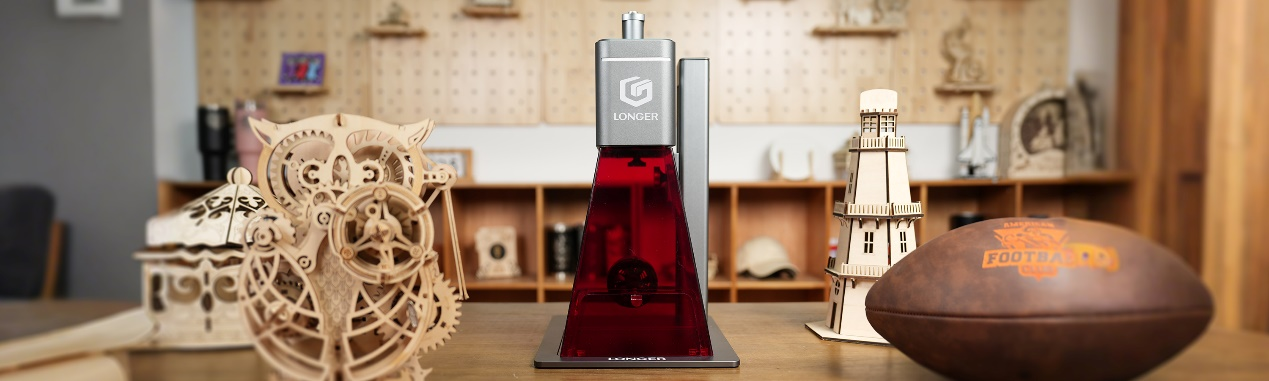
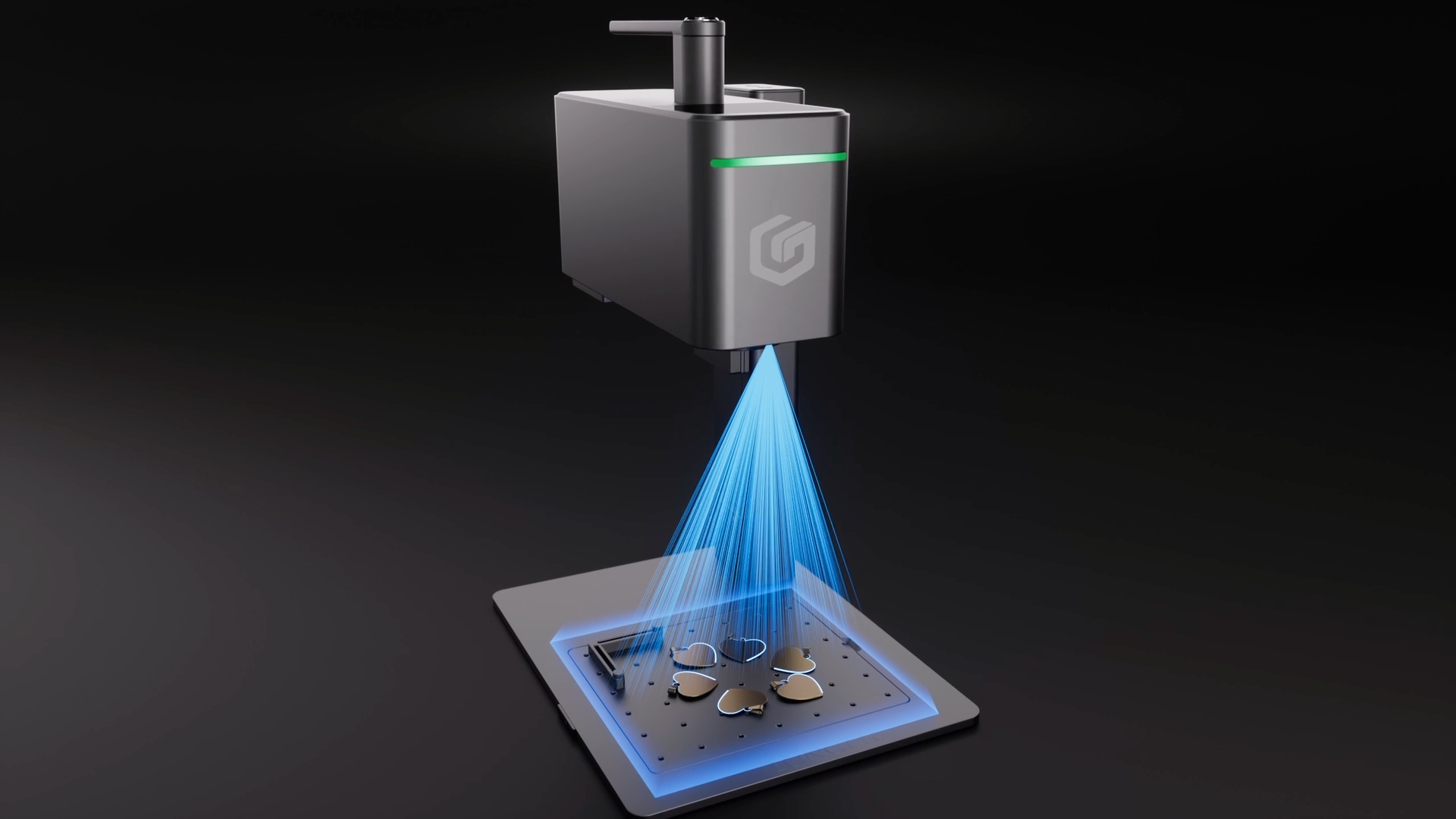
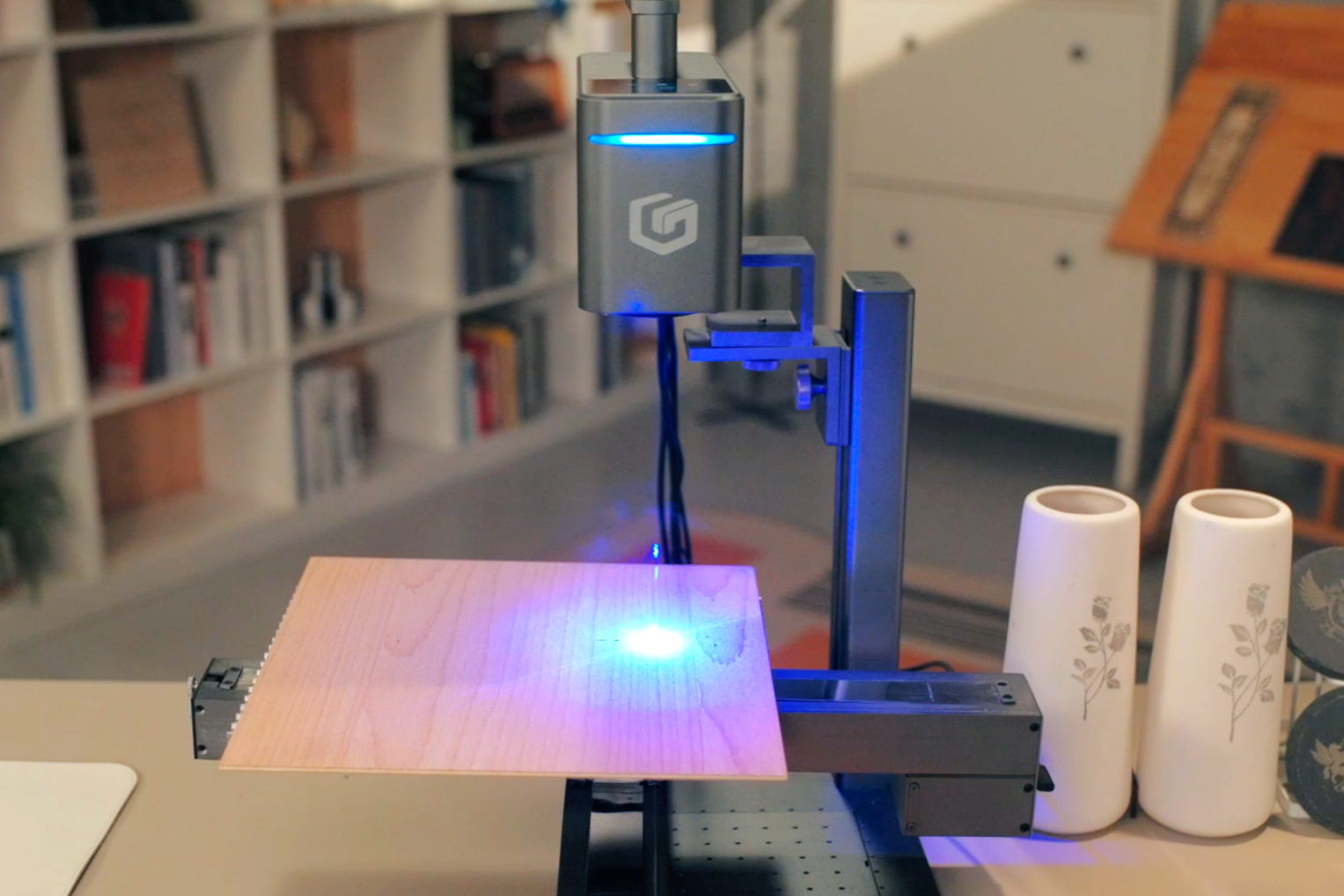
The future of laser engraving has arrived——LONGER is proud to announce the launch of its new Nano series: the Nano Duo Laser (20W Diode+2W IR) and the Nano Ruby Laser (Single 2W IR). These groundbreaking machines integrate cutting-edge AI technology, built upon years of investment and millions of dollars spent on perfecting the AI system. Starting from just $599 on Kickstarter (February 2025), these advanced engravers offer a professional, precise, and powerful engraving experience at an accessible price.

Plus: Starting from January 2025, can purchase a limited-time coupon for Nano Duo & Nano Ruby on the LONGER Official Website use for Kickstarter: Pay $50 Save $800. (This page will be displayed after subscribed).

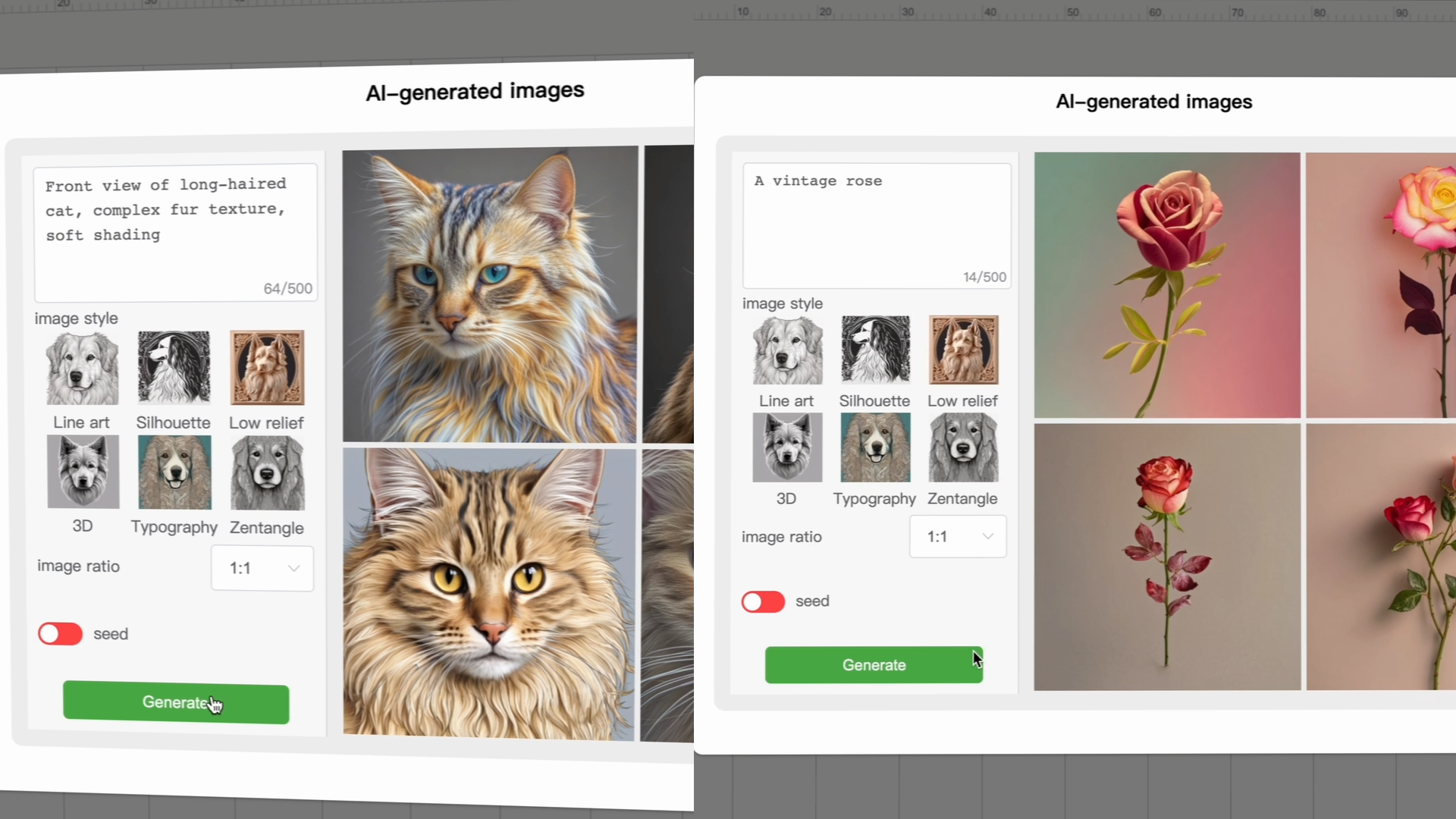
The Nano Duo and Nano Ruby are the second generation of LONGER’s portable engravers after first generation Longer Nano and Nano Pro, designed to deliver the performance creators crave. Longer Nano Duo is integration of LONGER’s TOP AI technology. This includes features like AI-Generated Images, AI Positioning, and AI Placement Sensing, making engraving simpler, faster, and more intuitive. Thanks to these enhancements, users can expect a flawless engraving experience with minimal effort. Whether it’s an intricate design on wood or a highly detailed engraving on metal, the Nano Duo helps you achieve professional-quality results with ease. Even more impressive is the ability to sync batches automatically, and utilize advanced features like AI Focus, AI Preview & Fill, and AI-Driven Engraver. These tools work seamlessly to automate processes, allowing creator to engrave like a true master with zero technical hassle.

Longer Nano Duo with a maximum engraving speed of 10,000mm/s, creators can complete projects quickly without compromising on quality. Whether it's intricate designs or large-scale projects, the Nano Duo ensures fast results while maintaining fine detail with an accuracy of up to 0.00199mm, this level of precision ensures that even the smallest, most intricate patterns are faithfully reproduced, whether working on wood, metal, or other materials. And equipped with 2W IR, it can be used to engrave on precious metals such as gold and silver.

Longer Nano Duo is also perfect for creating relief engravings. Thanks to its advanced laser technology and AI-driven focus control, it can carve out 3D effects and texture with remarkable depth and clarity. This makes it ideal for creating artistic designs that require detailed raised surfaces, such as logos, portraits, or decorative items. In addition, the LaserBurn developed by LONGER can support text-to-image 3D relief.

The text-to-image function powered by LONGER AI on the Nano Duo is a game-changer for creators. It simplifies the creative process by allowing creators to enter text, and within seconds, multiple unique images are automatically generated for selection. This eliminates the need to manually search for suitable images or designs, speeding up the workflow and enhancing creativity. The LONGER AI doesn't just generate random images—it understands the context and aesthetic preferences, offering multiple variations that suit different engraving needs. Whether it's a logo, a slogan, or an artistic design, the function provides a diverse range of options tailored to the creator's input. This level of convenience means that creators can spend less time searching for or designing images. Additionally, the LONGER AI's ability to provide multiple variations ensures that there is no need for tedious trial and error. Every design can be customized with ease, allowing for a smoother, faster, and more efficient engraving process.

Longer Nano Duo offers multiple connectivity options & compatibility, and even more flexibility through its range of powerful accessories that allow creator to tackle larger, more complex projects with ease. Whether at home, in the studio, or out in the field, the Nano Duo offers flexible connectivity options including Wi-Fi, USB, SD, and APP integration. It’s compatible with popular engraving software like LightBurn, LaserGRBL, and the LaserBurn APP from LONGER. The Nano Duo also features a 2.8-inch touch screen and an SD card slot, allowing for standalone operation without the need for a computer or phone.

The industry’s first Dual-Axis Extension & Single Extension
The Dual-Axis Extension expands the working area up to 300x300mm, enabling more complex projects and providing support for Smart Track Vertical Cut. The Single Extension increases the working area to 300x160mm, offering additional flexibility for smaller designs.

Rotary Extension
For creators who work with curve objects, the Rotary Extension allows engraving on curved surfaces like cups, bottles, and rings with diameters ranging from 1-150mm, opening up new creative possibilities. 

Conveyor Belt
The Conveyor Belt system is ideal for batch engraving, making it perfect for creators operating small businesses or taking on larger projects that require efficiency and consistency.

Enclosure and Purifier
The Enclosure is a practical addition, offering a 12038 fan and 100mm smoke exhaust tube to quickly extract smoke and dust during engraving. Paired with the Purifier, which filters over 99% of smoke and odors, it helps maintain a cleaner workspace and improves air quality.

Portable Power Bank and Carrying Case
For creators working in outdoor environments or on the go, the Portable Power Bank and Carrying Case provide an easy solution for transport and power, enabling engraving anywhere. With these accessories, the Nano series is ready to meet the demands of any engraving project, whether large or small.

Longer Nano Duo and Nano Ruby represent the next generation of laser engraving, combining cutting-edge AI technology with powerful performance to offer creators the ultimate engraving experience. Engrave like a Master, and engrave with precision, speed, and mastery like never before with the LONGER.

Where to buy from February: Kickstarter
Where to get coupon use on Kickstarter from January: LONGER

By update-event | January 13, 2025
Chitubox Plugins & Configuration of Orange 4K | Chitubox Set Printer - LONGER
Chitubox Plugins & Configuration of Orange 4K | Chitubox Set Printer

This article will help you solve CHITUBOX printer settings or CHITUBOX set printer issues. The LONGER Orange 4K 3D Printer is compatible with CHITUBOX slicing software. Please follow the steps below to complete the setup and configuration for stable resin printing.


Table of Contents

  • What This Guide Covers
  • Why This Process Matters
  • Before You Start
    • Requirements
    • Precautions
  • Step-by-Step Tutorial
    • Step 1: Install the Plugin for Orange 4K in CHITUBOX
    • Step 2: Import the Configuration for Orange 4K Printing Parameters
  • Common Problems and Solutions
  • Tips for Better Results
  • Frequently Asked Questions
  • Final Thoughts

What This Guide Covers

In this guide, you will learn how to:

  • Install the official Orange 4K plugin in CHITUBOX
  • Import default printing configurations from LONGER
  • Use the Orange 4K Mono and 4K Color parameters correctly
  • Reference printing parameters when using other resin brands

Quick Answer

To configure the Orange 4K in CHITUBOX:

  1. Download the appropriate .CHplugin file for your operating system.
  2. Run CHITUBOX and import the plugin.
  3. Import the official Orange 4K configuration file.
  4. Use default LONGER printing parameters as a reference for all your resin profiles.

Following these steps ensures compatible slicing files, correct exposure settings, and stable print results.


Why This Process Matters

CHITUBOX requires the correct plugin and configuration to communicate with the LONGER Orange 4K printer. Without it:

  • Print files may not be compatible
  • Resin exposure settings may be incorrect
  • Print quality can degrade
  • Print failures may occur

Using the official plugin and default configuration ensures stable printing, especially for beginners.


Before You Start

Requirements

  • LONGER Orange 4K or Orange 4K Mono 3D printer
  • CHITUBOX installed on your computer
  • Internet connection for downloading plugins and configuration files
  • Official LONGER Orange 4K configuration files
  • Administrative access to your computer

Precautions

  • Use only official plugin and configuration files
  • Close unnecessary software before installation
  • Do not rename plugin files
  • Do not modify exposure values initially
  • Follow official machine specifications or instructions

Step-by-Step Tutorial

Step 1: Install the Plugin for Orange 4K in CHITUBOX

Action

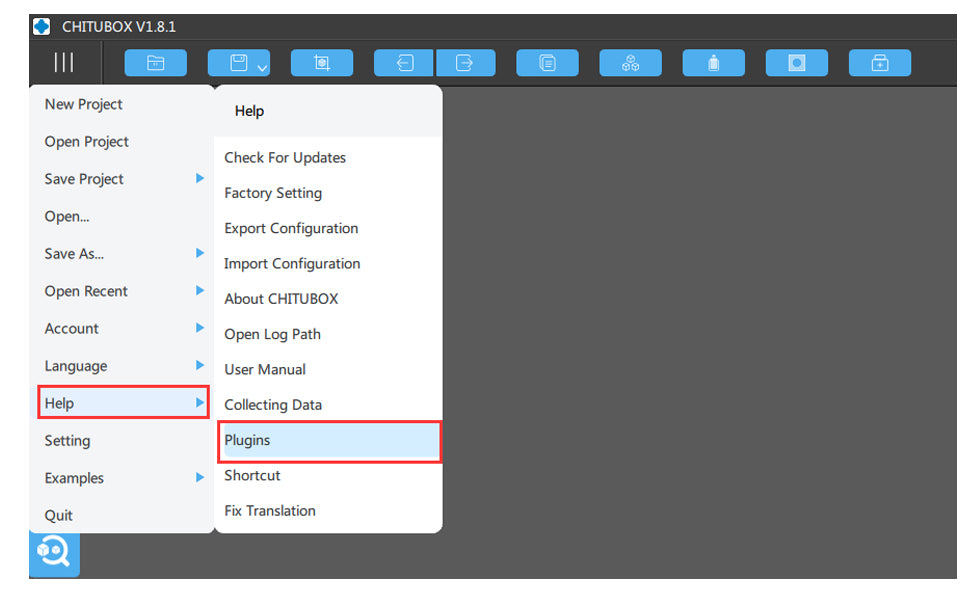
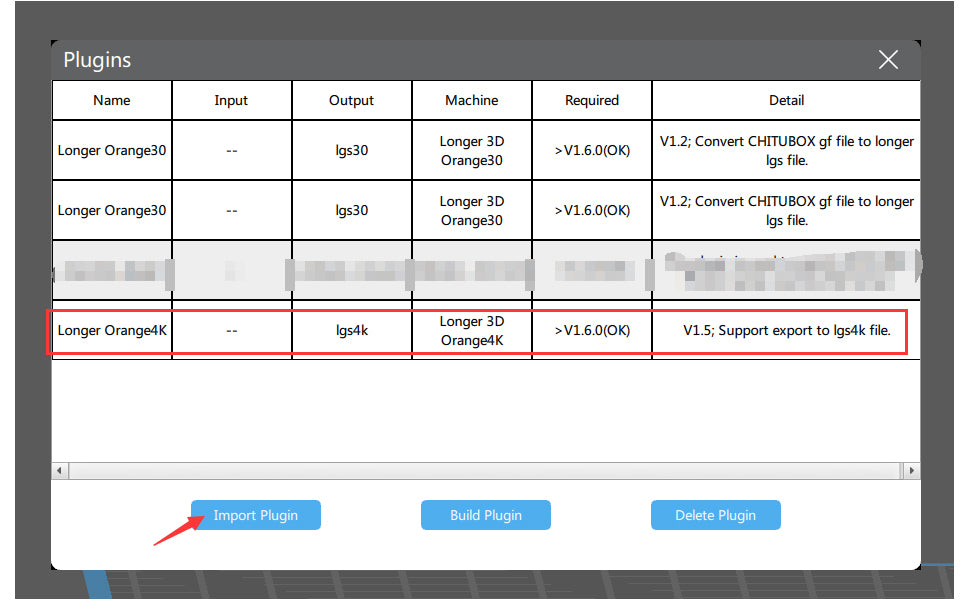
Run CHITUBOX and import the plugin. Download the plugin files for your system:

Open CHITUBOX and import the .CHplugin file from:

Main Menu > Help > Plugin

Expected Result

  • CHITUBOX recognizes the Orange 4K printer
  • Compatible slicing files can be generated
  • Orange 4K printer becomes available for all supported workflows

Important Notes

  • Ensure the plugin matches your operating system
  • If the plugin fails, restart CHITUBOX and re-import the file


Step 2: Import the Configuration for Orange 4K Printing Parameters

Action

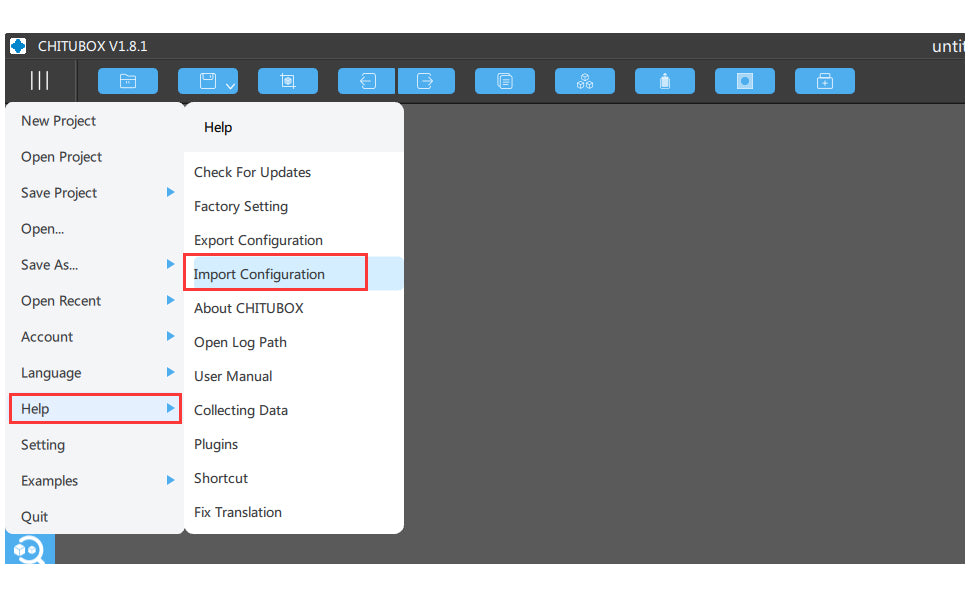
Import the official Orange 4K configuration file into CHITUBOX. After importing:

  • Default printing parameters from LONGER are applied
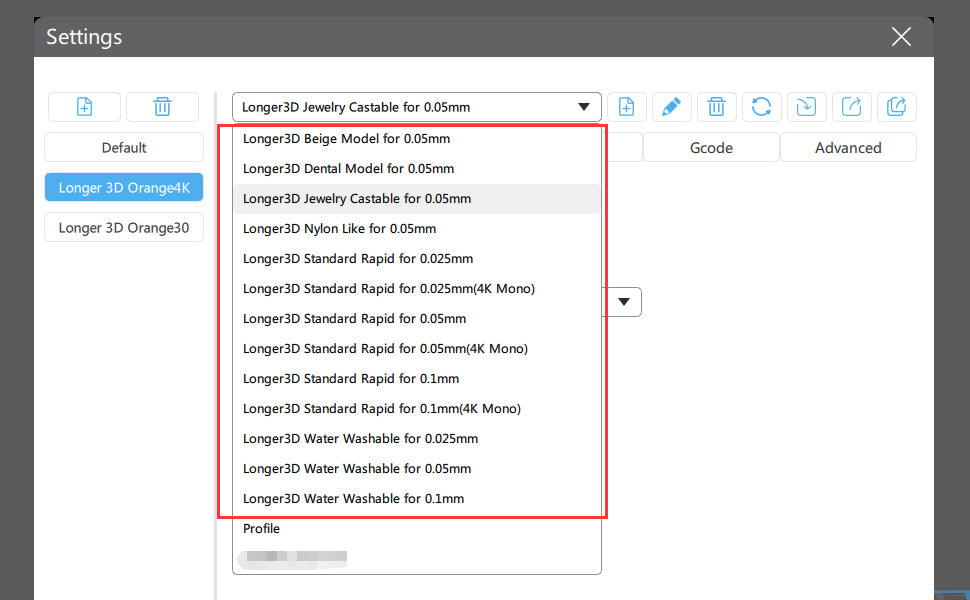
  • Resin profiles become available for reference

Note: Resin names with (4K Mono) are for Orange 4K Mono printers and use much less exposure time than 4K Color profiles.

Configuration of Orange 4K in Chitubox

Expected Result

  • Default print parameters appear in CHITUBOX
  • You can begin slicing files with correct exposure settings
  • Parameters can serve as references for other resin brands

Important Notes

  • Mono and Color printers use different exposure times
  • Incorrect settings may cause failed prints or overexposure
  • Always start with official profiles before adjusting for other resins

Understanding the Orange 4K Hardware

  • 5.5-inch monochrome LCD screen
  • 6480 × 3840 resolution at 10.5/31.5µm
  • Dual Z-axis for stable printing

The Orange 4K Mono prints faster and with higher precision due to its monochrome LCD, making it one of the finest LCD 3D printers available.

More information: Orange 4K Page

https://www.longer3d.com/collections/3d-printers-1

Common Problems and Solutions

Problem Possible Cause Solution
Plugin does not import Wrong OS version Download the correct .CHplugin
CHITUBOX cannot save slices Plugin missing Reinstall the plugin
Printer profile missing Config file not imported Re-import official Orange 4K configuration
Incorrect exposure Wrong resin profile Select (4K Mono) or 4K Color appropriately
Print fails to adhere Exposure mismatch Recheck default printing parameters

Tips for Better Results

  • Use official resin profiles first
  • Store plugin and config files in a dedicated folder
  • Verify printer type (Mono vs Color) before slicing
  • Reinstall plugin after CHITUBOX updates if needed
  • Test new resins with reference to LONGER profiles

Frequently Asked Questions

Q1: Does the Orange 4K need a plugin in CHITUBOX?
Yes, the official .CHplugin file is required for CHITUBOX compatibility.

Q2: Where to import the plugin?
Main Menu > Help > Plugin in CHITUBOX.

Q3: Difference between Orange 4K Mono and 4K Color?
Mono profiles use much lower exposure times than Color profiles.

Q4: Can I use other resin brands?
Yes, but start with LONGER default profiles as references.

Q5: Why is CHITUBOX not saving my slices?
This can happen if the plugin is missing or incompatible. Reinstalling the correct plugin solves this.

Q6: Which plugin file should I download?
Download the one matching your OS: Linux, macOS, Windows 32-bit, or Windows 64-bit.

Q7: Can I adjust print parameters manually?
Yes, but beginners should start with the official configuration first.

Q8: Is Orange 4K compatible with CHITUBOX?
Yes, it is officially supported for slicing and printing.


Final Thoughts

Following these steps ensures a stable setup for the LONGER Orange 4K in CHITUBOX. Using the official plugin and configuration files provides correct exposure settings and reliable slicing for both Mono and Color printers. Beginners should always start with official profiles and only adjust parameters after initial test prints.

Enjoy your printing with LONGER Orange 4K and share your results with the community!


By update-event | July 21, 2021
3D Printer Download Guidelines - LONGER
3D Printer Download Guidelines

To help users efficiently access all necessary resources for LONGER 3D printers, this guide organizes firmware, slicing software, manuals, and drivers in a clear structure. Each section also includes brief usage guidance to ensure proper installation and operation.

Longer3D Printers

1. LKxPro-Marlin

These firmware versions are based on the Marlin system and are mainly used for LK series FDM 3D printers. Users can choose the appropriate version based on compatibility and stability requirements. It is recommended to use stable versions unless specific features from newer firmware are needed.

2. Slicing Software Download - FDM 3D Printer

Slicing software converts 3D models into machine-readable G-code. LONGER Slicer is optimized for LONGER printers, while Cura provides more advanced parameter control for experienced users. Make sure to select the correct printer profile before slicing.

3. Slicing Software Download - Resin 3D Printer

These slicing tools are specifically designed for resin 3D printing. Chitubox and Lychee offer advanced support generation and exposure control, while LongerWare is optimized for compatibility with LONGER resin printers.

4. Firmware Download 

Firmware controls the core operation of your machine. Updating firmware can improve performance, fix bugs, and enhance stability. Always confirm your printer model before upgrading.

LK4 3D Printer

LK4 PRO 3D Printer

LK5 PRO 3D Printer

LK5 3D Printer

LK1 3D Printer

Cube 2 3D Printer

LK1 PRO 3D Printer

LK1 PLUS 3D Printer

Orange 10 3D Printer

  • Because there are several versions of firmware for Orange 10, please contact our support team first before updating at support@longer3d.net

Orange 4K 3D Printer

LONGER RAY5 laser engraver

5. Manual Download 

Manuals provide essential instructions for setup, operation, and maintenance. It is highly recommended to read them before using your machine.

LK4 3D Printer

LK4 PRO 3D Printer

LK5 PRO 3D Printer

LK1 3D Printer

Cube 2 3D Printer 

LK1 PRO 3D Printer

Orange 10 3D Printer

Orange 30 3D Printer

Orange 4K 3D Printer

6. Drive Program for FDM 3D Printer 

These drivers are required for establishing a stable connection between your computer and the printer. After installation, ensure the correct COM port is recognized by your system.

7. TF Card / USB Disk Content to LONGER 3D Printer  

These files usually include test models, sample G-code, and default configurations. They are useful for initial setup and functional verification.

8. TF Card Format Tool

Conclusion

If you still have any questions during operation, please visit our Support Page, where our knowledgeable staff is ready to assist you and your team with any technical inquiries. LONGER provides comprehensive support to ensure you can fully unlock the potential of your 3D printer. On the LONGER website, you will find an overview of products and services, frequently asked questions, software compatibility downloads, and detailed comparisons between different machine models to help you make informed decisions.

This comprehensive resource guide is designed to help users quickly locate and correctly use all necessary files for the LONGER 3D printers. By following the structured categories and ensuring compatibility between firmware, software, and hardware, users can significantly reduce setup issues and improve overall workflow efficiency. Whether you are installing your machine for the first time or optimizing performance through updates, having access to the correct resources and understanding their purpose is essential for achieving stable operation and high-quality results across different applications.

By update-event | January 24, 2021